Wireframe to Corporate Web Banner
GPT Image 2 image prompt by KAWAI · original post
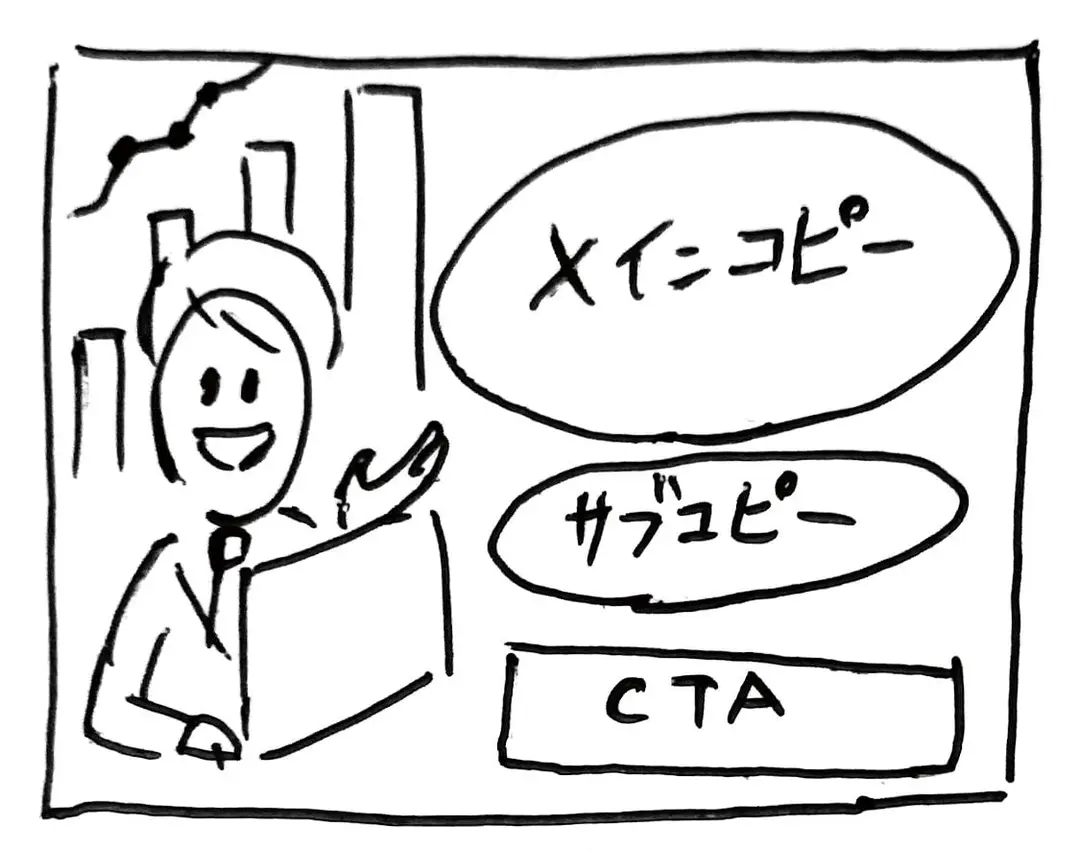
Transforms a rough hand-drawn wireframe into a polished, professional web banner ad with photorealistic subjects, vector graphics, and customizable Japanese copy.
the prompt
Using REFERENCE_0 as a wireframe layout, generate a polished, professional corporate web banner ad for an AI sales tool. Use a clean blue, white, and orange color palette. Transform the sketched character into a photorealistic image of 2 smiling Japanese business professionals (a man and a woman in suits) looking at a silver laptop in a bright office. In the top left, add a logo for {argument name="brand name" default="KAWAISALES"} with a small tagline 'AIを活用した新しい営業支援ツール'. Map the wireframe's text bubbles as follows: replace the top bubble with a white oval containing the blue text {argument name="main copy" default="その営業、AIで「飛躍」しませんか?"}; replace the middle bubble with {argument name="sub copy" default="リード獲得からクロージングまでAIがあなたの営業活動を強力サポート!"}. Replace the bottom CTA box with a bright orange pill-shaped button reading {argument name="cta text" default="今すぐ 無料デモを体験する >"}. In the lower-right center, add a blue 3D-style bar chart with an upward arrow, accompanied by a target icon showing 3 user silhouettes and a white UI card with 4 checkmarked bullet points. Finally, add a white panel in the bottom left containing exactly 3 blue line-art icons (a clock, a rising chart, and a laptop) with short captions below each.- model
- GPT Image 2
- type
- image
- shape
- 1:1
- shared
- April 19, 2026
- prompt
- 186 words
Made this? Fix the credit or remove it.